
Storage Rules are the heart of EmpireManager. You set them up once. Every character on your account follows them.
First-time setup: the Wizard#
Don’t want to build a rule set from scratch? Click the wand icon in the Storage tab header (or run /em wizard) to launch the Storage Setup Wizard. It seeds a starter rule set from one of five templates: Self-Banker, Mule Banker, Guild/Warband, Split by Expansion, or Stash Everything Else. You can edit anything afterward.
The idea#
Most bank addons make you build per-item rules. (“Iron Ore goes to my warrior. Copper Ore goes to my hunter. Silk Cloth goes to…”) That’s a lot of clicks, and one new patch later your rules are out of date.
EmpireManager asks one question: which professions go where?
The addon already knows herbs are for Alchemy, Inscription, and Herbalism. It knows Mageweave Cloth is a Tailoring mat. You don’t tell it that. You just tell it:
- Alchemy mats go to Warband Tab 2.
- Inscription mats go to my Guild Bank, Tab 1.
- Leatherworking mats go to my banker character’s personal bank.
Done. Every alt on every Realm now follows those rules.
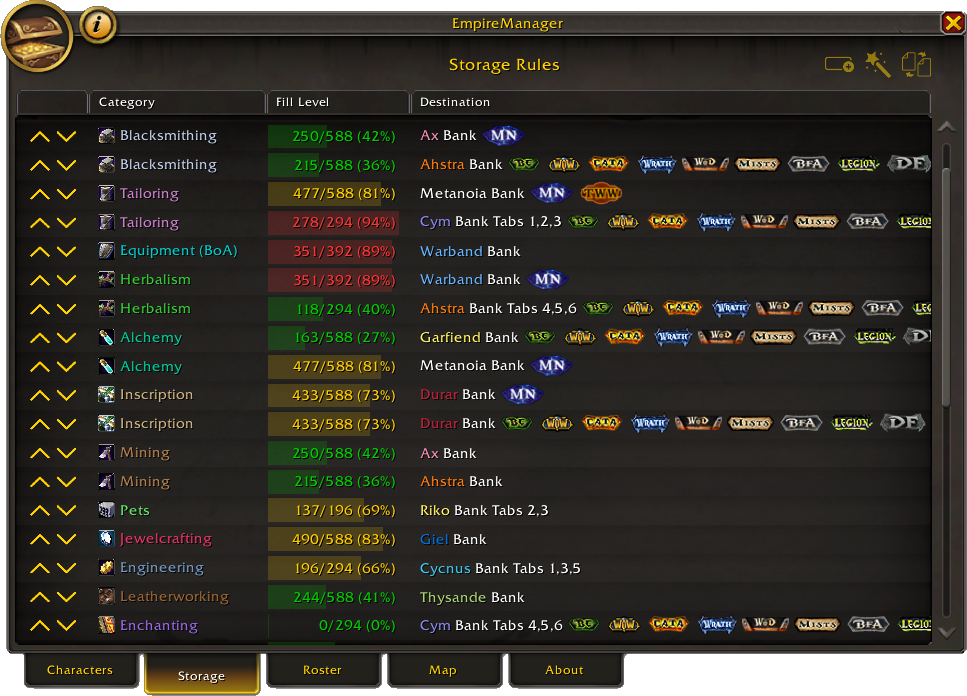
The three destinations#
| Type | Who can reach it | When to use |
|---|---|---|
| Warband Bank | Any character on your account | The simplest option. No banker needed, no mailing. Use this for anything you don’t need cross-Guild. |
| Guild Bank | Anyone in that Guild | Best for shared stockpiles. Out-of-Guild alts will mail their items to a banker first. |
| Character Bank | One specific character | A dedicated bank alt. Out-of-realm alts can’t mail items here, so they’ll stash in the Warband Bank instead. |
Priority and overflow#
Rules are an ordered list, top to bottom. For any item, EmpireManager walks the list and picks the first rule that matches.
A rule matches when its profession/category fits the item and any expansion filter is satisfied. So you can layer narrow rules above broad ones:
- Herbalism -> Warband Tab 1 (Midnight only)
- Herbalism -> Guild Bank “MyGuild” Tab 2 (any expansion)
Midnight herbs hit rule 1. Older herbs skip rule 1 (the expansion filter excludes them) and land in the Guild Bank.
Overflow when a destination fills up#
If a matching rule’s destination is full, the item spills into the next matching rule instead. Use this to chain a primary bank to a backup:
- Alchemy -> Warband Tab 2
- Alchemy -> Guild Bank “MyGuild” Tab 3
When Warband Tab 2 has zero free slots, alchemy mats route to the Guild Bank automatically. If every matching rule is full, the item stays in your bags and Triage shows it with the note “All matching destinations are full.”
Reordering rules#
Use the up/down arrows on each row in the Storage tab. Click moves 1 step. Ctrl+click moves 5 steps. Shift+click jumps to the next rule for the same profession.
Expansion filters#
Each rule can be limited to specific expansions. Useful for:
- Keeping current-expansion mats in the Warband Bank where you’ll actually use them.
- Pushing legacy mats off to a Guild Bank or alt.
If you don’t set an expansion filter, the rule covers everything.
A few categories don’t have expansion data (battle pets, for example). For those, the expansion option is greyed out.
When professions overlap#
Some materials match more than one profession. Herbs are useful to Alchemy, Inscription, and Herbalism. Ore goes to Mining and Blacksmithing.
There’s no built-in tier or preference between gathering and crafting - top-of-list wins, full stop. If you want herbs to follow your Herbalism rule, put that rule above any Alchemy or Inscription rule for the same item set. If you’d rather they go to Alchemy, put the Alchemy rule on top.
Your alt’s location matters#
When an alt scans their bags, rule destinations are resolved with Realm and Guild context in mind. In practice this means same-realm rules can mail, while cross-realm regular items stage in the Warband Bank.
For the full matrix and mailbox behavior, see Mailing.
Filling up your tabs#
Every time you open a bank, EmpireManager remembers how full each tab is. The Storage tab shows a colored fill bar:
- Green: plenty of room.
- Yellow: getting full.
- Red: nearly out of space.
This is how you’ll spot “Warband Tab 2 is at 96/98” before you try to deposit another stack of herbs into it. Hover a row to see when its capacity was last scanned - useful for alts you haven’t logged into in a while.
Reorganizing what’s already in the bank#
Storage Rules apply to bags and existing bank contents. Running Reorganize from Bag Triage moves misplaced items to their assigned tab; items with no matching rule are left alone. See that page for the full bank-actions behavior (Restack vs Reorganize vs Take Out).
Things you don’t have to configure#
- Per-item rules.
- Per-character rules (beyond setting the alt’s roles in the Sidecar).
- Priority numbers - you reorder visually with arrows instead.
- ItemIDs, classes, subclasses.
- What is and isn’t “a herb” - the addon already knows.
See also#
- Roles & Assignments - assign roles to your alts.
- Bag Triage - the button that actually moves items based on these rules.
- Mailing - recipients, batching, and cross-realm behavior.
- Import & Export - share your rules with your Guild.