
Roles tell the addon what each character is for. They’re the answer to “who is my crafter?”, “who handles the auctions?”, “who do I mail locked boxes to?” Combined with your profession Storage Rules, they decide where every item in Bag Triage ends up.
You don’t need to assign every role on every alt. Start with one or two on the alts you actively play, and fill the rest in as you go.
Assigning Roles#
Open the Dashboard with /em (or the minimap button) and click any character row - the Sidecar slides out on the right. Check the roles that apply on the Assignments tab and close the panel when you’re done; everything saves as you click.
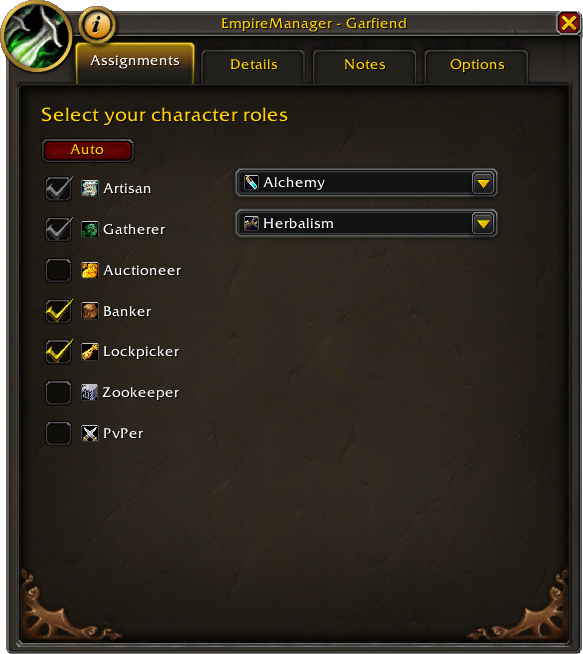
Use Auto for Artisan and Gatherer#
Artisan and Gatherer also let you pick which professions go with that role. The Auto button at the top of the Assignments tab fills those in from what the game reports - both the role checkbox and the matching profession picks.
Auto is just a shortcut. You can check the role and its professions by hand if you’d rather, and Auto is safe to click any time - if the character has no professions, it just clears stale selections.
The Other Roles#
Auctioneer, Lockpicker, Zookeeper, and PvPer are personal preference, so you always check those yourself.
Banker is the exception - you don’t usually set this one by hand. Any character you point a Guild Bank or Character Bank Storage Rule at gets flagged as a Banker for you.
Setting Up a Whole Roster#
Have a lot of alts? Bring them in through Import/Export with the Auto-assign roles checkbox enabled, and EmpireManager will mark every imported character as Artisan or Gatherer based on their professions in one pass.
The Roles#
Artisan#
Your crafter. Each character can hold up to 2 crafting professions (Alchemy, Blacksmithing, Enchanting, Engineering, Inscription, Jewelcrafting, Leatherworking, Tailoring).
Gatherer#
Your farmer. Up to 2 gathering professions (Herbalism, Mining, Skinning).
Auctioneer#
Sells on the Auction House. Unbound BoE gear, recipes, and other sellable items route here so you can post them without dragging stuff across alts. One Auctioneer per Realm is typical, since cross-realm mail can’t carry tradeable items.
Banker#
The empire’s warehouse keeper. You don’t usually set this one by hand - whenever you make a character the destination of a Guild Bank or Character Bank Storage Rule, they’re flagged as a Banker automatically.
The Banker is also the preferred mail recipient when an item needs to cross into a Guild Bank, since they’re the one with access.
Lockpicker#
The character who receives locked lockboxes from everyone else. Set this on whoever can actually open them - Rogues, Mechagnomes (racial), or Blacksmiths with Skeleton Keys.
Zookeeper#
Receives caged battle pets, pet charms, and pet consumables. Set this on the alt you actually use for pet battles so new pets aren’t scattered across the roster.
PvPer#
Same idea as Zookeeper, but for PvP currency items - Marks of Honor and similar tokens get funneled to your dedicated PvP character.
What the Addon Already Knows#
When you log into a character, EmpireManager reads their professions straight from the game and remembers them - that’s where the profession icons in the Dashboard’s Prof column and the per-expansion skill numbers in tooltips come from.
That’s a separate thing from the Artisan/Gatherer profession picker in the Sidecar, though. Those checkboxes are how you tell the addon which professions to actually route mats for, so they start empty until you check them (or click Auto to fill them in from what the game reports).
Multiple Characters, Same Role#
Having two Artisans, two Auctioneers, or two of anything else is fine and expected - most rosters have specialists, like one Artisan for old-world crafts and one for current expansion.
See also#
- Sidecar - the panel where you actually check the role boxes.
- Storage Rules - how routing decisions are made once roles are set.
- Bag Triage - the system that uses your roles to sort items.