
This page covers what happens when you click Mail All Routable in Bag Triage - who gets the items, in what order, and what restrictions WoW puts on the process.
Opening the mailbox#
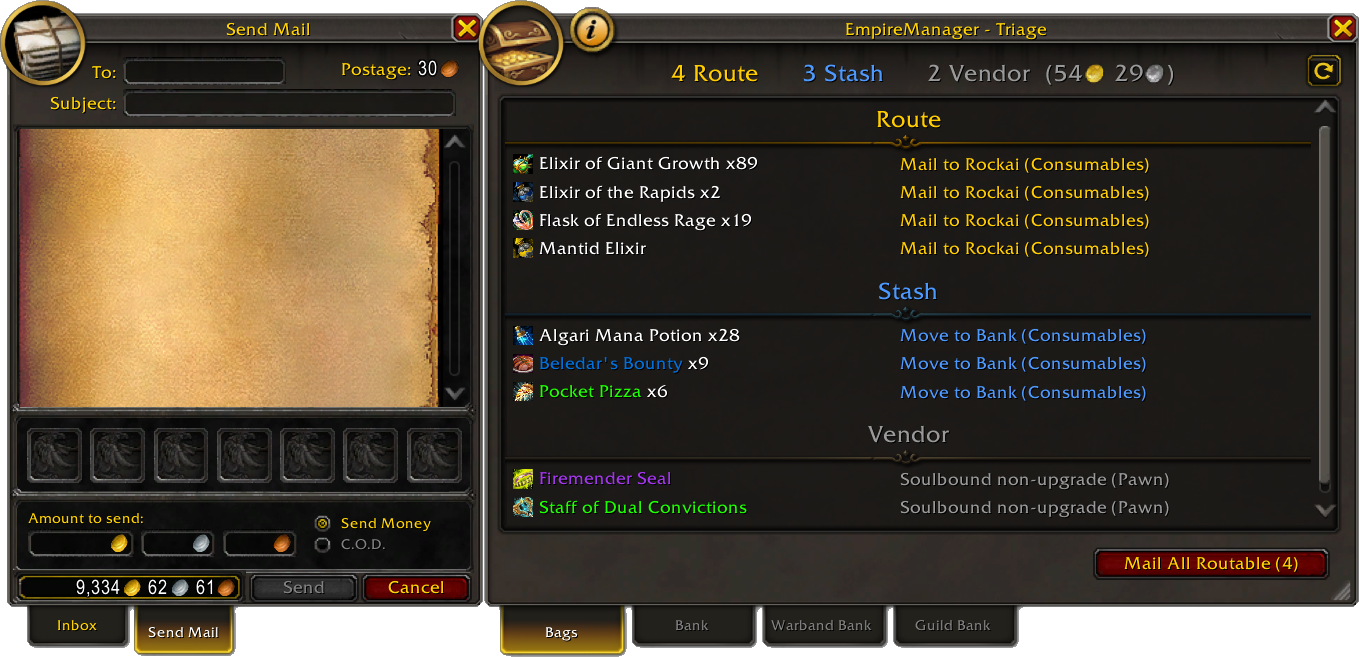
When you walk up to a mailbox:
- EmpireManager rescans your bags.
- If anything classifies as Route, it prints
[Triage] N items to routein chat. - If Open on Mailbox Open is on in Options, the Triage window pops open anchored to the right of MailFrame.
The chat line is gated by the Chat Messages option, not by the auto-open toggle - turn off auto-open and you’ll still see the count.
Who each item gets mailed to#
Every Route item has one named recipient, decided once when Triage classifies the item.
| Item type | Recipient |
|---|---|
| Profession mats with a Character Bank rule | The named banker character |
| Profession mats with a Guild Bank rule | A character in that Guild. Bankers preferred - any character flagged with the Banker role wins over other Guild members |
| Locked lockboxes | The character with the Lockpicker role |
| Caged battle pets and pet items | The character with the Zookeeper role |
| PvP tokens | The character with the PvPer role |
| Unbound BoE gear | The character with the Auctioneer role |
| BoE gear flagged for disenchanting | The Enchanter (an Artisan with Enchanting), if Disenchant Routing is on |
For everything except Character Bank profession rules, EmpireManager prefers a same-realm recipient first, then falls back per the cross-realm rules below.
Cross-realm rules#
WoW restricts what crosses realms via mail:
| Item type | Cross-realm mail |
|---|---|
| Warbound / account-bound | Allowed (same Battle.net account) |
| Regular items (potions, herbs, non-warbound BoE) | Blocked |
| Gold | Blocked |
EmpireManager never queues a move WoW will reject:
- Same-realm recipient available - the item routes to mail, full stop.
- Only cross-realm recipients, item is warbound - still routes to mail, addressed as
Name-Realm. - Only cross-realm recipients, item is not warbound - the action flips to “Stash in Warband Bank for [Name]”. Drop it in your Warband Bank instead and the recipient picks it up there.
- No recipient with that role at all - the item Keeps and you get an “unreachable” warning in chat (see Troubleshooting Triage).
Mail All Routable: the flow#
Click the button at a mailbox (on the Send Mail tab) and Triage:
- Groups Route items by recipient.
- Sorts the recipients alphabetically.
- Pops a confirmation dialog for the first recipient.
The per-recipient dialog#
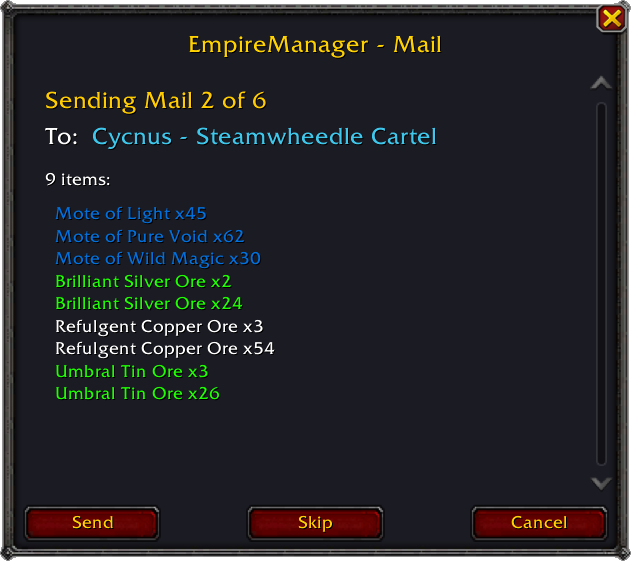
For each recipient you see:
- Header:
Sending Mail N of M. - To:
Name - Realm, class-colored. - Items: the list for this batch, each with its rarity color.
- Buttons: Send (mail this recipient and advance), Skip (advance without mailing), Cancel (abort the whole pass).
Items routed via warband-stash fallback (cross-realm regular items) don’t appear in this dialog at all - they classify as Stash, not Route, and move via Deposit All Stash when you visit your Warband Bank.
Batching#
Each mail holds up to 12 attachments - that’s Blizzard’s limit, not the addon’s. If a recipient has more than 12 routable items, Triage sends multiple mails back to back, waiting for each one to confirm before sending the next. Items locked or missing at attach time are skipped silently, and the final count reflects what actually went out.
When things don’t go through#
A mail batch can fail for a few reasons. The Triage window shows you what happened in chat:
| Message | What happened |
|---|---|
| “Mailbox closed before sending” | You walked away from the mailbox before the addon could attach. |
| “Mailbox closed, mailed N items before interruption” | You closed the mailbox mid-batch. Anything already attached and confirmed stayed sent. |
| “Mail to [Name] failed, mailed N items before failure” | WoW returned a MAIL_FAILED for the batch. Common causes: recipient name doesn’t exist, recipient mailbox is full, you don’t have enough money for postage. |
| “Mail send timed out, skipping remaining batches” | The server didn’t respond within 5 seconds. Try again, or check if mail is broken realm-wide. |
The Triage button itself stays disabled while a mail pass is running and re-enables when the pass ends (either cleanly or via Cancel / closing the mailbox).
Disabled-button reasons#
When Mail All Routable is greyed out, hovering it shows why:
- “Open a mailbox to send” - no mailbox is open.
- “Switch to the Send Mail tab” - mailbox is open but you’re on Inbox.
- “Nothing to route” - no Route items in the current scan.
Limits#
- Gold cannot be sent (yet). Mail All Routable only handles items.
- 12 attachments per mail is Blizzard’s limit.
- No auto-send - every recipient needs your explicit Send click.
- Cross-realm only carries warbound items. Everything else stages in the Warband Bank.
See also#
- Bag Triage - the window where Mail All Routable lives.
- Roles & Assignments - who Lockpickers, Zookeepers, PvPers, Auctioneers, and Bankers are.
- Storage Rules - what makes a Profession item route to a Character Bank vs Guild Bank vs Warband Bank.